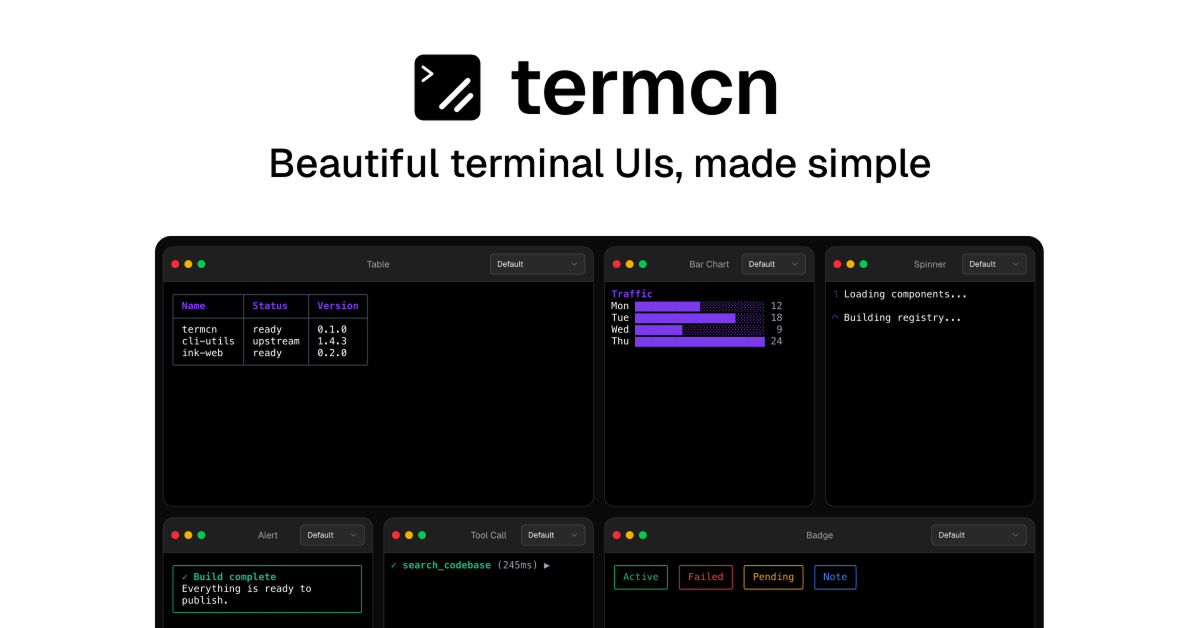
Details about Termcn
Free, open-source library of ready-to-use, customizable terminal UI components for React.
Built on Ink (the popular React-based terminal renderer) and fully compatible with the shadcn/ui CLI workflow.
100+ components with 10+ terminal themes and ready-made templates.
Zero config, one-command installation — copy-paste or CLI adds.
Focus on clean, modern terminal aesthetics with great accessibility and customization.
Perfect for CLIs, developer tools, AI agents, dashboards, and any terminal-based React app.
#What is Termcn?
Termcn is a beautiful and practical component library that brings the beloved shadcn/ui experience to terminal UIs. It provides production-ready, customizable React components built on top of Ink, allowing developers to create polished, modern-looking terminal interfaces with minimal effort. It's ideal for anyone building CLIs, developer tools, AI agents, internal dashboards, or terminal-based applications who wants consistent, accessible, and visually appealing output without reinventing the wheel every time. Following the exact shadcn philosophy, components are added via the familiar CLI or copied directly into your project, giving you full ownership and easy customization while leveraging Ink’s powerful rendering capabilities.
#Features ⚡
100+ Ready-to-Use Components: Including Spinner, Table, Bar Chart, Alert, Badge, Tool Call, Progress, Input, Select, and many more.
10+ Terminal Themes: Beautiful pre-built themes with easy switching for different aesthetics and branding.
Ready-Made Templates: Pre-configured layouts and full terminal app starters for faster development.
shadcn CLI Compatibility: Install with one command — pnpm dlx shadcn@latest add @termcn/spinner (or any component).
Full Customization: All components are fully editable with Tailwind-like styling and Ink primitives.
Accessible & Performant: Proper keyboard navigation, screen-reader support, and optimized rendering.
Zero Config Setup: Works seamlessly once Ink is installed in your React project.
#Pros ✅
Brings the joy and speed of shadcn/ui directly to terminal applications.
High visual quality with clean, modern terminal designs that feel premium.
Extremely easy adoption for anyone already familiar with shadcn/ui.
Completely free and open-source with active development.
Great for AI tools, CLIs, dev dashboards, and internal tooling.
#Cons ⚠️
Requires an existing Ink setup in your React project (not a standalone terminal framework).
Terminal UIs are niche — best suited for CLI/devtool projects rather than general web UIs.
Component count is growing rapidly but still smaller than full web shadcn/ui libraries.
Rendering depends on Ink, so some browser-specific features are not applicable.
#Included Components - Templates
Core UI Elements: Spinner, Alert, Badge, Progress, Input, Select, Checkbox, Radio.
Data Display: Table, Bar Chart, List, Tree View, JSON Viewer.
Interactive: Tool Call, Command Input, Confirmation Dialog, Multi-Step Prompts.
Layout & Navigation: Header, Sidebar, Footer, Tab Bar, Status Bar.
Special: Log Viewer, Terminal Frame, Typing Animation, Theme Switcher.
Templates: Full CLI app starters, dashboard layouts, and AI agent interfaces.
#Pricing 💸
100% free and open-source — no paid tiers or restrictions.
All components, themes, templates, and registry access are completely free.
MIT licensed for personal and commercial use.
#Integrations 🧰
Ink: Core rendering engine for terminal UIs.
shadcn/ui: Full CLI registry compatibility and design philosophy match.
React: Primary framework (used with Ink).
TypeScript: Fully typed components.
Next.js / Vite / any React setup: Works wherever Ink runs.
GitHub: Source at github.com/Aniket-508/termcn.
Frequently Asked Questions
What is Termcn?
A shadcn/ui-style library of beautiful, customizable terminal UI components built on Ink for React.
Is it free?
Yes, 100% free and open-source with no limitations.
How do I install components?
Use the shadcn CLI: pnpm dlx shadcn@latest add @termcn/[component-name] after setting up Ink.
Termcn
Collection of beautifully designed customizable terminal UI
Resource Types:
UI Kits :
Shadcn UITechnology Stack :
Featured Shadcn Products
Add Featured ProductFeatured products will be displayed here.
Have a product?
Submit your Shadcn product to AllShadcn, get featured, and drive genuine traffic while showcasing your work to the world. Turn your creativity into revenue and begin selling today! 🚀