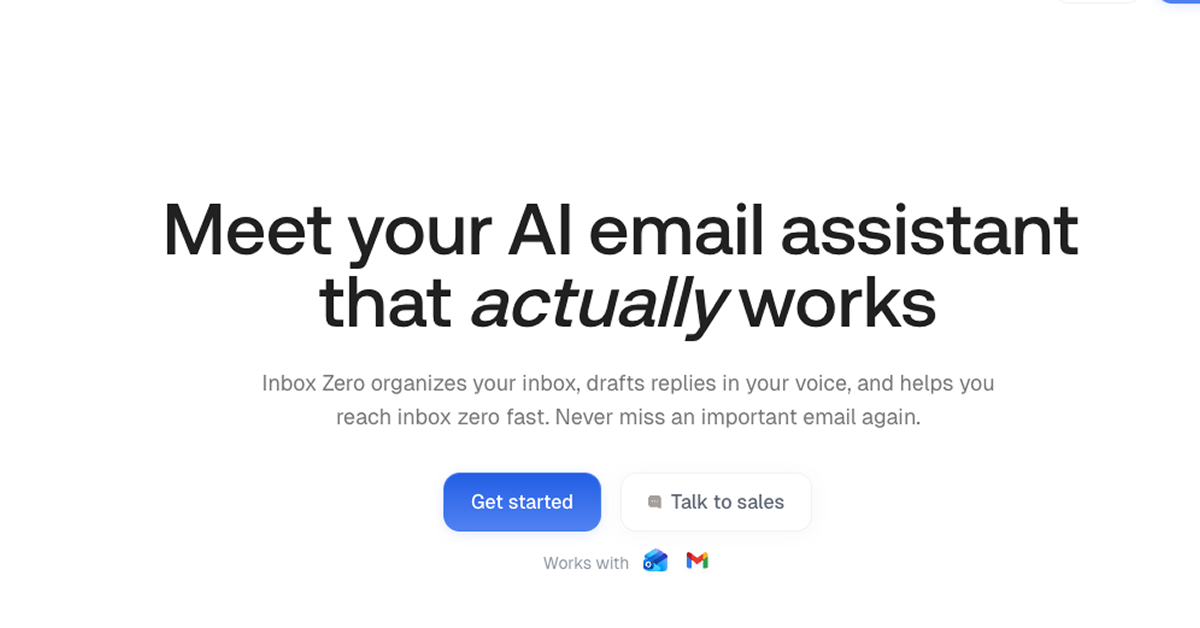
Details about Inbox Zero - Automate and clean your inbox
AI-driven organization that labels and sorts emails into smart categories like Urgent, To Reply, and Newsletters to never miss what's important
Personalized reply drafts in your voice, pulling from email history and calendar for context-aware responses that feel authentically you
Bulk unsubscribe, archive, and cold email blocking to declutter your inbox fast, saving hours on manual triage
Open-source with 9k+ GitHub stars, #1 on Product Hunt, and trusted by 15k+ developers and execs for privacy-first automation
One-click setup in 3 minutes alongside Gmail, Outlook, or Google Workspace—no replacement for your client, just a smart sidekick
Enterprise-ready with SOC 2 compliance, self-hosting options, and custom plans for teams handling high-volume inboxes
#What is Inbox Zero?
Inbox Zero is an open-source AI email assistant built for busy developers, entrepreneurs, and teams drowning in email who want to reclaim their day without switching tools or hiring help. Its core value is transforming chaotic inboxes into organized, actionable flows by automating sorting, drafting, and cleanup, so you focus on high-impact work instead of endless scrolling. Powered by privacy-focused AI that never trains on your data, it integrates seamlessly with Gmail, Google Workspace, and Microsoft Outlook, using your past emails and calendar for hyper-personalized automation—ideal for use-cases like streamlining client comms in agencies, prioritizing leads in sales pipelines, or just hitting that satisfying zero unread count before EOD.
#Features ⚡
Automatic Email Organization: AI scans and labels incoming messages into custom or pre-set categories (e.g., Marketing, Team, Cold Email) for instant prioritization and zero missed opportunities.
Personalized Draft Replies: Generates ready-to-send responses in your exact tone, incorporating email threads, attachments, and calendar availability for spot-on, professional replies.
Bulk Unsubscribe & Archive: One-click mass actions on unread clutter, newsletters, or promotions to purge inboxes without regret—plus auto-blocking of unsolicited cold outreach.
Email Analytics Dashboard: Tracks top senders, response times, and inbox bottlenecks with visual insights to refine habits and workflows over time.
Calendar & CRM Context: Pulls in your schedule and customer notes to draft smarter emails, like suggesting meeting slots or referencing past interactions automatically.
Custom Rules Engine: Tweak behaviors in plain English—no code needed—for tailored sorting, forwarding, or notifications that match your unique rhythm.
Cold Email Shield: Proactively filters and blocks spam-like pitches, keeping your inbox focused on real conversations.
#Pros ✅
Massive time savings with 3-minute setup and drafts that nail your voice, often replacing pricey VAs entirely
Rock-solid privacy (no data training, SOC 2 certified) and open-source transparency build trust for sensitive workflows
Flexible for solos to enterprises, with self-hosting and compliance features that scale without lock-in
Community-loved with 15k+ users raving about clutter-free inboxes and actionable insights
Works alongside your existing email client, enhancing rather than disrupting your flow
#Cons ⚠️
Relies on connected accounts (Gmail/Outlook only), so switching providers mid-use requires reconfiguration
Advanced team features like shared analytics are Pro/Enterprise-locked, potentially limiting small teams on Starter
AI drafts, while impressive, may still need light edits for highly nuanced or legal-sensitive replies
#Included Components - Templates
Inbox Zero delivers a full automation toolkit right out of the gate: pre-built AI categories for common workflows (Newsletter, To Reply, Marketing, Calendar, Notification, Cold Email, Team, Urgent) with customizable rules; reply draft templates that auto-adapt to thread context, attachments, and user history; bulk action panels for unsubscribe lists, archive queues, and sender blocks; analytics reports with sender frequency charts and engagement trends; plus integration hooks for calendar events and CRM notes— all open-source via GitHub for forking, extending, or self-hosting with your own AI tweaks.
#Pricing 💸
Free Trial ($0) – 7 days across all plans, no credit card required, full access to test automation on your inbox.
Starter Plan ($18/user/month billed annually) – Core sorting, drafting, blocking, bulk actions, and basic analytics for individuals or light users; 10% savings on annual vs. monthly.
Professional Plan ($42/user/month billed annually) – Everything in Starter plus unlimited knowledge base, team analytics, priority support, and dedicated onboarding; 16% annual discount.
Enterprise Plan (Custom pricing) – All Pro features with on-premise options, advanced security/SLAs, dedicated manager, and training; contact sales for quotes tailored to your scale.
No hidden fees, cancel anytime, and 14-day refunds if it doesn't deliver value—monthly billing available at full price.
#Integrations 🧰
Email Clients: Gmail, Google Workspace, Microsoft Outlook for seamless inbox access and actions.
Calendar Tools: Native sync with Google Calendar or Outlook Calendar to inform draft timing and availability.
CRM Systems: Pulls customer data from connected CRMs (e.g., HubSpot, Salesforce via API) for contextual replies.
Open-Source Ecosystem: Full GitHub repo for custom extensions, with community hooks for Zapier, Slack notifications, or custom AI models.
Frequently Asked Questions
Which email providers does it support?
Gmail, Google Workspace, and Microsoft Outlook—setup in under 3 minutes.
Does it replace my email client?
No, it enhances Gmail or Outlook by automating alongside them. How private is my data? Extremely—SOC 2 Type 2 certified, no AI training on your emails, and self-hosting available.
Can teams use it?
Yes, Pro and Enterprise plans add shared analytics and onboarding for collaborative workflows.
Inbox Zero - Automate and clean your inbox
Automate emails, bulk unsubscribe, block cold emails, and analytics.
Resource Types:
UI Kits :
Shadcn UITechnology Stack :

Have a product?
Submit your Shadcn product to AllShadcn, get featured, and drive genuine traffic while showcasing your work to the world. Turn your creativity into revenue and begin selling today! 🚀