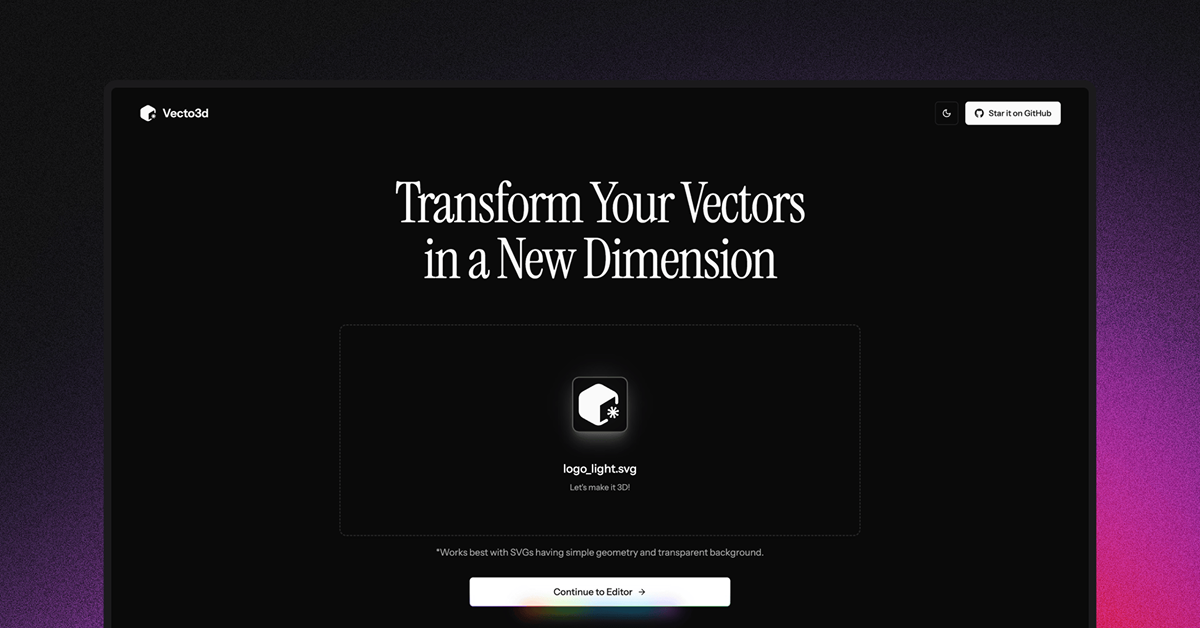
Details about Vecto3D
Free, open-source web-based tool for converting simple SVGs (like logos) into customizable 3D models.
Features adjustable geometry (thickness, bevels), material selection (Glass, Metal, Plastic), and environment/background options.
Supports exports in STL, GLB, GLTF formats for 3D models and PNG (HD, 2K, 4K) for previews.
Built with Next.js (App Router), React, shadcn/ui, and Magic UI; live demo at vecto3d.xyz.
MIT-licensed with 1.3k GitHub stars and 78 forks; ideal for designers and devs prototyping 3D assets.
#What is Vecto3D?
Vecto3D, developed by Lakshay Bhushan, is an intuitive, browser-based converter that transforms basic SVG files—particularly logos—into polished 3D models with minimal effort. It empowers designers, developers, and creators to experiment with 3D without complex software, offering real-time previews and extensive customization options like material textures, lighting environments, and "Vibe mode" for dreamy effects with bloom and soft shadows. Deployed as a Next.js app on Vercel, it's perfect for quick prototyping in web design, branding, or AR/VR previews, where you upload an SVG, tweak parameters, and export ready-to-use files. As an open-source project, it invites community contributions to expand its capabilities, making 3D asset creation accessible and fun for non-experts while providing solid code for advanced users.
#Features ⚡️
SVG Upload & Conversion: Drag-and-drop simple SVGs to generate 3D extrusions instantly.
Geometry Customization: Adjust thickness and bevels for depth and edge smoothness.
Material Library: Choose from Glass, Metal, Plastic, and more for realistic renders.
Environment & Background Controls: Select presets or upload custom images; tweak preview panel colors.
Vibe Mode Toggle: Adds atmospheric bloom and soft shadows for artistic, ethereal outputs.
Multi-Format Exports: 3D models in STL/GLB/GLTF; high-res PNG previews (HD/2K/4K).
Real-Time Preview: Interactive 3D viewer with orbit controls for immediate feedback.
#Pros ✅
User-Friendly Interface: Intuitive controls make 3D conversion approachable for beginners.
Versatile Exports: Supports industry-standard formats for 3D printing, web embedding, or further editing.
Customization Depth: Extensive options like Vibe mode add creative flair without complexity.
Free & Open-Source: No costs; fork the repo for tweaks or integrations.
Performance Optimized: Next.js ensures fast loads and smooth previews in-browser.
#Cons ⚠️
SVG Limitations: Best for simple shapes/logos; complex paths may not convert cleanly.
No Advanced Modeling: Lacks full 3D editing tools—focused on quick conversions.
Browser-Dependent: Requires decent hardware for real-time rendering; no offline mode.
Early-Stage Project: 1.3k stars show popularity, but features like batch processing are absent.
No Mobile Optimization: Desktop-first; touch interactions may feel clunky on phones.
#Included Components - Templates
Vecto3D's codebase is structured as a Next.js app with modular React components for the editor:
Upload Handler: Drag-and-drop zone in app/edit/ for SVG input.
3D Previewer: Interactive canvas using Three.js (inferred) for model viewing and controls.
Control Panel: Sidebar with sliders for thickness/bevels, dropdowns for materials/environments (components/controls/).
Export Utilities: Buttons generating STL/GLB/GLTF files and PNG screenshots (lib/export.ts).
UI Primitives: shadcn/ui and Magic UI for buttons, toggles, and modals (components/ui/).
Templates: Single-page editor route (app/edit/page.tsx); no multi-page, but extensible for galleries.
Example usage snippet (from repo inference): Upload SVG → Adjust bevel: 2px → Select Metal material → Export GLB for Blender import.
#Pricing 💸
Vecto3D is completely free and open-source under the MIT license. No tiers, subscriptions, or hidden fees—use the live tool at vecto3d.xyz or self-host via GitHub clone. Exports are unlimited; community contributions keep it evolving without costs.
#Integrations 🧰
Web-focused with modern dev tools:
Next.js (App Router): Core framework for routing and SSR.
React: Custom hooks and components for stateful editor.
shadcn/ui + Magic UI: Accessible, animated UI primitives.
Tailwind CSS: Responsive styling (inferred from shadcn base).
V0.dev: Used for prototyping UI elements.
Three.js/GLTF Exporter: For 3D rendering and file generation.
Vercel: Deployment for the live demo.
Frequently Asked Questions
What is Vecto3D?
A free tool to convert simple SVGs to customizable 3D models with exports in STL/GLB/GLTF.
Is Vecto3D free?
Yes—MIT open-source; use online or self-host.
How do I export?
Adjust settings, click export—downloads GLB for 3D apps or PNG for images.
Vecto3D
A super simple tool to convert SVG logos to 3D models
Resource Types:
UI Kits :
Shadcn UITechnology Stack :
Have a product?
Submit your Shadcn product to AllShadcn, get featured, and drive genuine traffic while showcasing your work to the world. Turn your creativity into revenue and begin selling today! 🚀